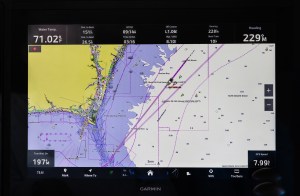


Chartplotters are designed for waypoint navigation. You are always navigating to something, and along the way, you want to cruise comfortably, likely venturing from time to time beyond the plotted path. No matter what, you want to avoid nasty places that could cause problems.
A chartplotter can help with that, if you understand avoidance navigation. Many of the features that are built into today’s chartplotters can be used for more than their original intent. For instance, a chartplotter can often tell you when the boat is nearing the rocks, shoals or restricted areas, provided you know how to use the functions.
The obvious approach is to monitor the boat’s location on the chartplotter screen continually, and then focus and interpret the on-screen chart for hazards. Not only is this way of doing things tedious, but it draws your attention away from whatever is happening around you.
One solution is to tag dangerous obstructions or hazards. The good way to do that is to make them waypoints. A waypoint can be anything you want it to be, even a hazard or dangerous area. Just make sure you clearly identify the bad waypoints so you don’t accidentally use them in a route. Generally, you can do that by selecting a specific waypoint symbol and name.
With that set, you can monitor the chartplotter screen and see if your boat is nearing any of these dangerous waypoints. But even this way of doing things is still a bit tedious.
Various alarm functions may help. Almost all chartplotters have an alarm for waypoint arrival notification. You set a desired radius around the waypoint, and an alarm sounds as soon as you penetrate it. It’s possible to use that feature to alert us about a dangerous waypoint, although some chartplotters require it to be an active waypoint to get the alarm. That would mean constantly activating new hazard waypoints. That would be bad.
But there are other ways. Simrad, B&G and Lowrance allow for alarms with every waypoint. Garmin and Furuno have a boundary alarm function that lets you select a specific location and set a circle around it, causing an alarm on entry.
Next on the list of options is Cross-Track Error (also called Off Course or XTE). This function provides the lateral distance that the boat has moved away from the active course line. It comes in handy when navigating to a waypoint, as it helps keep you on course. Almost all chartplotters have an alarm that can be set if you exceed a distance you specify.
Imagine creating a rectangular box that defines the area where you want to cruise. In many cases, this box may be long and somewhat narrower. Position this box so that most of the bad places are outside its boundaries. Then, create a two-point route that you have no intention of following. Each point lies at the middle of the narrow side at each end of the rectangle. Next, activate this route and set the crosstrack error alarm to half of the short-side distance.
As long as you keep the boat within the limits of the two waypoints, an alarm will sound if you wander beyond the set lateral limit. This technique is particularly useful for sailors tacking against the wind who don’t want to wander into danger.
Another function on most chartplotters is the anchor alarm. It is intended to alert you if the anchor drags, causing the boat to leave a defined circle. You can also use it to define a circular safe area of operation. Simply select the center point and set the radius. You can then can cruise freely within the circle and receive an alarm and pop-up should you go beyond its limits.
Many chartplotters also have an alarm for depth. While this does not keep you away from isolated hazards, it does keep you in deeper water. You can set the draft of the boat, and the alarm will indicate that you are approaching shallower water. Depending on the chartplotter, it may need data from a depth sounder to work. Some models use the charted depth as the indicator based on an internal chart.
And one more thing about the boundary function by Garmin and Furuno: A boundary can be a line, circle or area. You select from a menu. With a circle, you can select the center point and radius around it. You also can set the circle so the alarm sounds if you enter or leave it. You can have multiple circles, which are useful. For example, circle hazards within your cruising area, then activate the alarms to get notifications of any intrusion.
Selecting a line is simply a matter of defining two points and determining which side is the alarm. The third option, area, is ideal for avoidance navigation because, in essence, you create a polygon shape. You identify the location of each corner and then define the shape of the area you choose. This area can be named and stored. As with the circle, you can set the alarm to sound if you enter or leave the shape.
Since most boaters tend to operate in a defined region, it makes sense to build the avoidance areas and have them active while you’re out cruising.
This article originally appeared in the December 2025 issue of Passagemaker magazine.